The platform
One platform for the whole funeral organisation
Membership, money, policies, claims, reporting and communication, working from the same records. Here is everything Burial Desk does, organised by the work it supports, with who each part is for.
01
Membership and administration
The register, the people who run it, and the meetings that hold a society together.
-
Join codes
Members sign up with a code you share however you like: eight characters, valid for seven days, up to ten uses. They join straight away and keep their own details current.
-
Members added by staff
Administrators add people themselves. Someone who already has a Burial Desk account is sent a code to accept, never added without their say.
-
Member requests
A secretary asks for a member to be added; an administrator approves or rejects, and the request records the outcome.
-
Member records
Search by name, ID number or phone. Each record shows standing, payments, what is owed, beneficiaries, nominees and documents.
-
Spreadsheet import
Bring up to 5 000 people across from a CSV file, with every row checked and previewed before anything is created.
-
Roles and permissions
Each role sees and does only what it needs. Burial societies have member, treasurer, secretary, administrator and owner roles, with permissions you can adjust; policy companies have administrator, agent and broker roles.
-
Digital membership card
Each member's card shows their society, role, standing and a QR code that officers scan at meetings.
-
Meetings and attendance
Schedule meetings with hosts, scan members' card QR codes or let them check in with the meeting code, and keep minutes with the meeting.
-
Document library
Constitution, minutes, forms and financial documents in one place, with private documents for each member.
02
Contributions and payments
Every rand recorded once, against the right person, with the arithmetic done for you.
-
Contribution records
Treasurers record payments as cash, bank transfer or mobile money, and members see their own history month by month.
-
"I've paid", confirmed
Members declare a payment with a photo of the slip; the treasurer confirms or rejects it, and only confirmed payments count.
-
What each member owes
Balances are worked out from your monthly contribution and recalculated every night, with opening balances and write-offs recorded with a reason.
-
Automatic good standing
Missed meetings, missed months and debt are judged against your society's thresholds every night, with an administrator override.
-
Premium payments
EFT, cash and debit-order payments recorded against each policy, moving its next due date and arrears on.
-
Bank statement matching
Import a CSV statement and Burial Desk suggests the policy for each payment. Staff confirm one at a time or all at once; repeated lines are flagged.
-
Online payments
Card and instant EFT payments through your own PayFast merchant account, checked with PayFast and recorded automatically.
03
Policies and premiums
For funeral policy companies: from the product to the policy book.
-
Product configuration
Unlimited plans, each with a cover amount, base premium, add-on premiums for spouse, children and extended family, natural and accidental waiting periods, a grace period and a reinstatement window.
-
Group plans
Plans for burial societies priced per member or per society, alongside your individual plans.
-
Online quote
Prospective policyholders see your plans with their cover and premiums, choose family members and see the total before applying.
-
Self-service enrolment
Applicants create an account with a validated ID number and enrol on their phone. The policy is issued at once, in its waiting period.
-
Covered lives and beneficiaries
Policyholders name the people they cover and their beneficiaries with percentage shares, and upload their ID.
-
The policy book
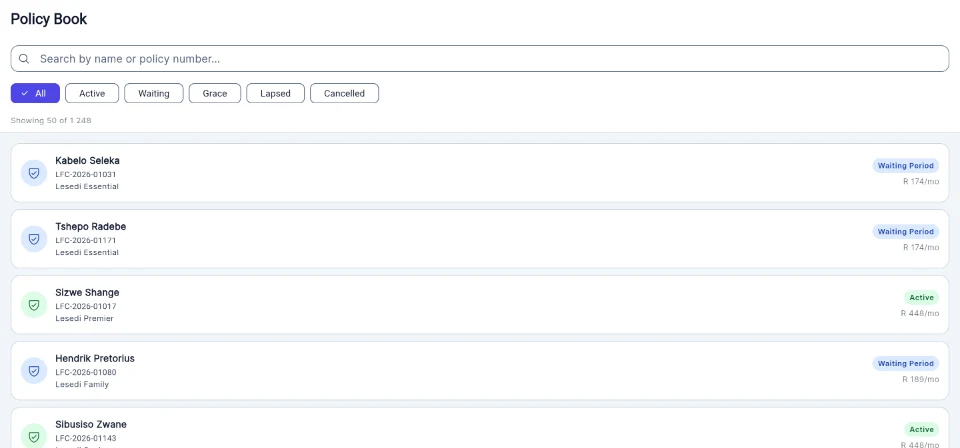
Every policy's status, dates, premium, next due date and arrears, searchable and filterable.
-
Grace, lapse and reinstatement
Overdue policies move into grace and then lapse each night, with notices to the policyholder. Staff reinstate within the plan's window.
-
Staff and agent enrolment
Administrators enrol policyholders directly; agents submit enrolments for approval, and where you pay commission the policy is credited to that agent.
-
Group cover for burial societies
A policy company offers a burial society group cover on agreed terms. Once the society accepts, the company sees its roster and beneficiaries while the scheme is in force.
-
Brokerages and agents
Record your brokerages and appoint agents under them, keeping the history of every appointment.
-
Commission
Commission on premiums at the rate you set, rolled into monthly statements you approve and mark paid. Each agent sees their own statements.
-
Policy documents
Certificates of cover, policy agreements and welcome letters generated as PDFs with your details and wording.
04
Claims and beneficiaries
The people cover pays for, and a consistent path from the first notice to the decision.
-
Beneficiaries with approval
Members name the people their cover pays for; an administrator or secretary approves each one. Your society sets the limit.
-
Payout nominees
Members name up to three people to receive their benefit, with shares that add up to 100%, each approved by the organisation.
-
Society claims
Members lodge claims for their beneficiaries and administrators for a member's death. Your waiting period and debt rules are enforced when the claim is filed.
-
Policy claims
A claim records the cause of death, which decides the waiting period that applies, and is checked against the policy when it is filed.
-
Claim documents
Death certificates and ID documents stored privately with the claim. No claim can be approved without a death certificate.
-
A controlled claim status
A claim moves from pending to approved or rejected and paid only through the system's own steps; nobody edits a status by hand.
-
Adjudication
One screen shows the policy, the covered person, the cause and dates; every decision needs notes and every rejection a reason.
-
Claims Management Pro
Approval thresholds by claim value, bulk approve or reject, and payout runs exported as one payment file for your bank.
05
Reporting and analytics
Figures the committee and the board can act on, without building a spreadsheet first.
-
Society dashboard
Active members, money collected this month and overall, payments awaiting confirmation, a six-month collections chart and members by status.
-
Society reports
Contributions, attendance, fines and a financial summary, each exportable to CSV.
-
Activity log
A log of key events, such as registers submitted, balances adjusted and hosts changed, with who did each. Exportable to CSV.
-
Company dashboard
The policy book, collections and claims figures for administrators, worked out each time it is opened.
-
Report Builder
Build reports from your policies, claims, members, contributions or premium payments: choose the columns, the period and a filter, run them now or on a daily, weekly or monthly schedule, and reopen every run or export it as CSV.
06
Communications
Keep members and policyholders informed, and know what reached them.
-
Announcements
Post an announcement and every member sees it in the app.
-
Notifications
An in-app inbox for meetings, payments, beneficiary decisions and claims, with push notifications where people have allowed them.
-
Messages to members
Send an email or push message to the members you choose, and see what was sent and what failed.
-
Outbox and delivery status
Every message your organisation sends, including statements and notices, with what became of it: sent, delivered, bounced or failed.
-
Cover statements by email
Email a member or policyholder a statement of their cover, with a link that opens without a password.
07
Compliance and governance
Controls that support your compliance work. Your licensing and legal obligations stay yours.
Security and data protection-
Access enforced by the database
Who can read or change each record is enforced by row-level security in the database, not only hidden in the app.
-
Audit trail
Changes to policies, premium payments, claims and policy documents are recorded with who made them, when, and the values before and after. Administrators can browse and filter the log.
-
Protected staff access
The Burial Desk staff console asks for a password and a code from an authenticator app.
-
ID number checks
South African ID numbers are checked as they are entered on the add-member form and on policyholder sign-up and enrolment, including the date of birth and check digit.
-
KYC records
Staff with the compliance permission record when a staff-enrolled policyholder's identity has been verified.
-
Reviewed providers
Every funeral company that registers is reviewed by our team before it appears in the online quote or can take self-service enrolments.
-
Data protection requests
People delete their own account from their profile, or ask on our website and confirm by email. Every request is recorded on our side, and what an organisation must keep by law stays with it.
08
Integrations and automation
The connections and scheduled work that keep the records current.
-
PayFast
Online card and instant EFT payments into the organisation's own PayFast account.
-
Nightly work
Balances and good standing for societies, grace, lapse and premium reminders for policies, recalculated every night.
-
CSV exports
Reports and registers exported for your accountant or your own systems.
-
API access
Read-only API keys for your policies, claims, contributions and members, each with its own scopes, rate limit and optional expiry, and revocable at once.
-
White label
Your brand colours across the app for your members and team, in light and dark mode, with text colours chosen so it stays readable.
See it for your organisation
Two ways in, depending on who you serve
Your organisation deserves better systems.
Take the next step towards simpler, smarter funeral organisation management.
Prefer email? Write to hello@burialdesk.co.za.