For burial societies

Burial society management, from the first contribution to the last claim

Members, contributions, meetings, beneficiaries and claims in one app that your treasurer, your secretary and every member can use. Built for South African burial societies.

  • Plans from R199 a month, excl. VAT
  • Set up online
  • Android app and web
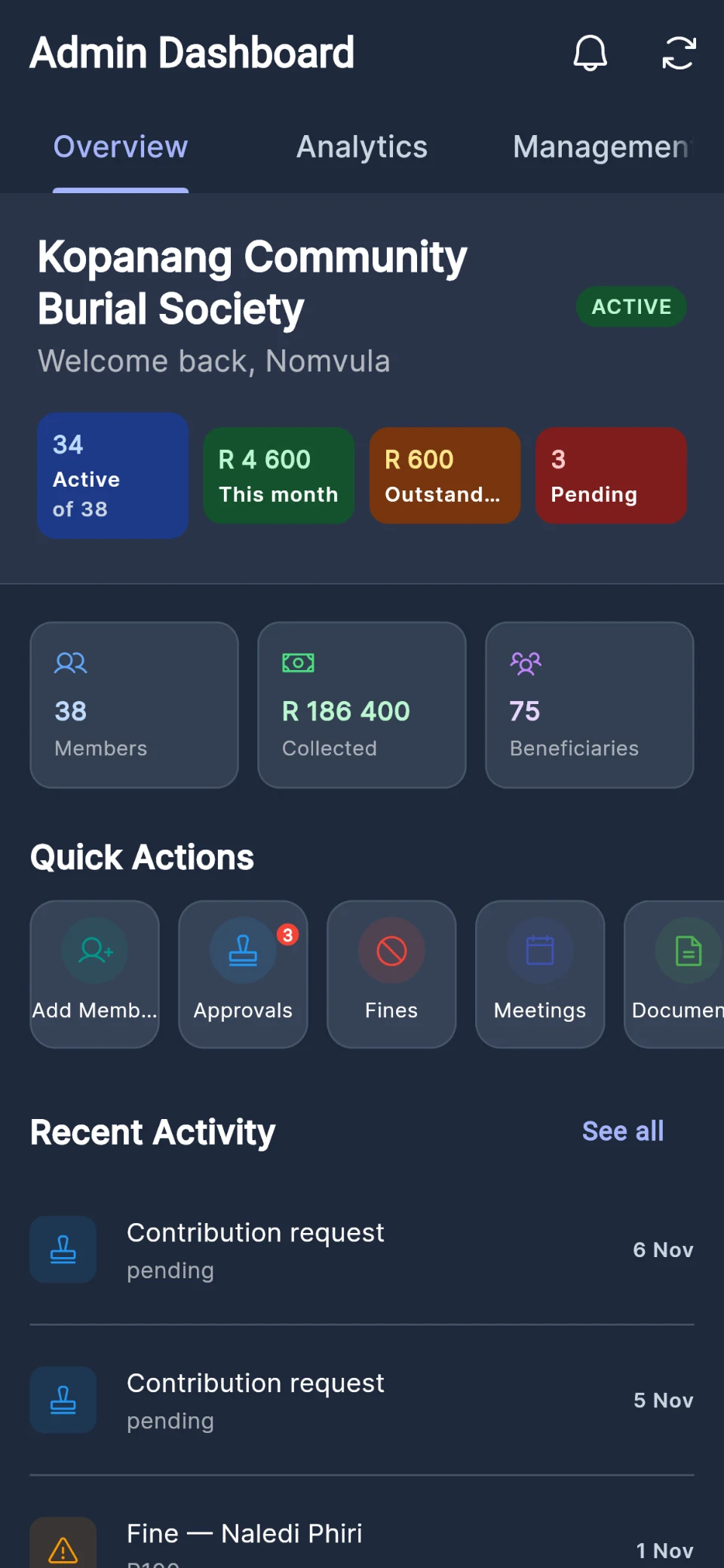
A burial society administrator's dashboard in Burial Desk: active members, money collected this month, payments awaiting confirmation and approvals waiting, shown with sample data.

The questions every committee knows

Answered from the record, not from memory

  • "Who has paid this month?"

    Every payment is recorded against the member, and what each member owes is worked out for you.

  • "Is this member covered?"

    Good standing is calculated from your society's own rules and shown on the member's record and card.

  • "Who came to the meeting?"

    Attendance is captured at the door, and the minutes stay with the meeting.

  • "Who are the beneficiaries?"

    Members name them, and an administrator or secretary approves each one.

  • "Where is the death certificate?"

    Documents are attached to each claim, and your society's rules are checked when it is filed.

  • "Who changed this?"

    An activity log records key events, such as registers submitted and balances adjusted, with who did each.

Members

A register that keeps itself current

Give members a join code and they sign up and join straight away, then keep their own details up to date. Add members yourself when that is easier, or bring your whole list across from a spreadsheet.

  • Join codes you share however you like: eight characters, valid for 7 days, up to 10 uses each
  • A secretary can ask for a member to be added; an administrator approves
  • Import your member list from a CSV file, checked and previewed before anything is created
  • A digital membership card for every member, with a QR code for meetings
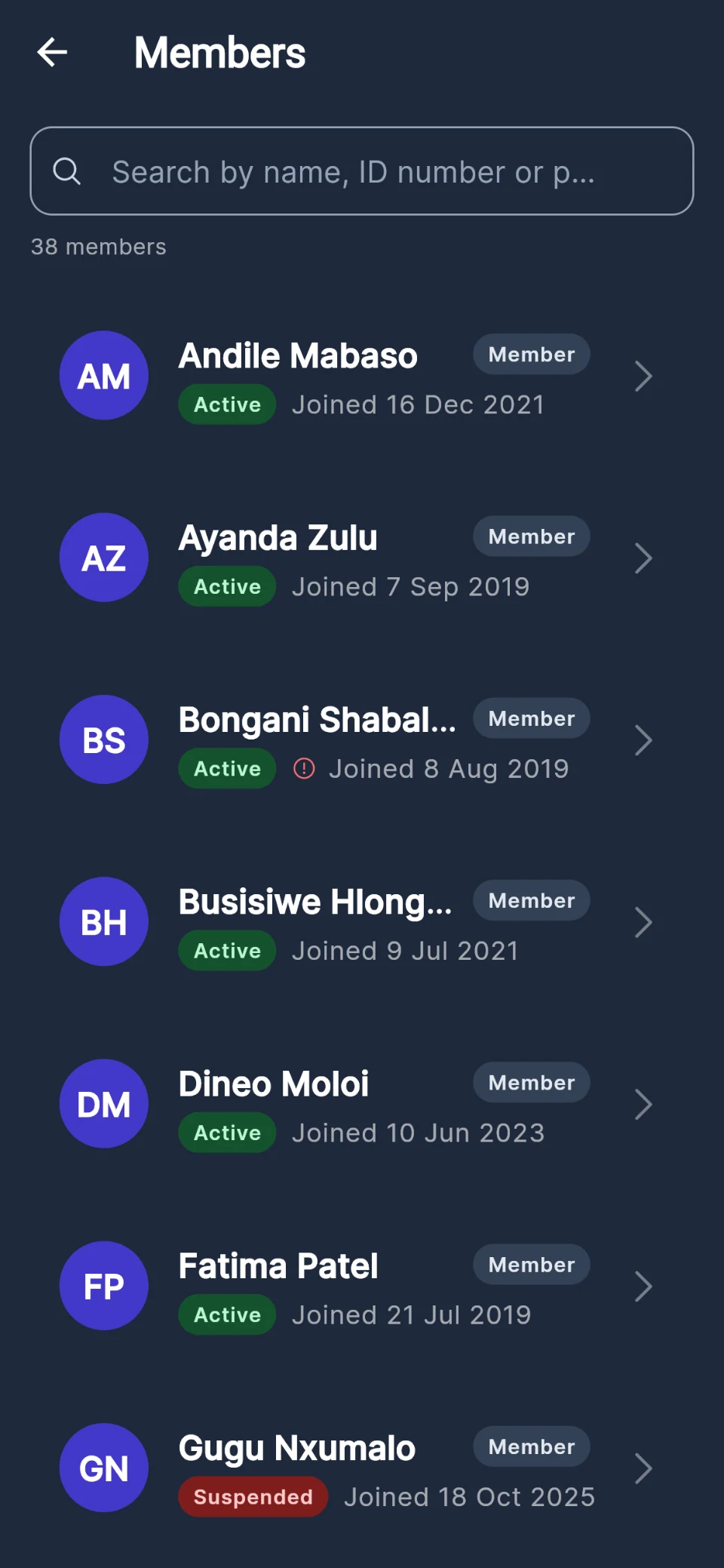
A burial society's member list in Burial Desk, with each member's status, role and join date, and members out of good standing flagged, shown with sample data.

Contributions

Every rand accounted for, and every member able to see it

Your treasurer records payments as they come in. Members who have paid by EFT or cash tell you so in the app, with a photo of the slip, and the treasurer confirms each one. Burial Desk works out what every member owes from your monthly contribution, and recalculates it every night.

  • Cash, bank transfer or mobile money, recorded per member
  • "I've paid": members send proof, the treasurer confirms or rejects
  • Opening balances and write-offs, each with a reason the member is told
  • Online card and instant EFT payments through your own PayFast account, recorded automatically
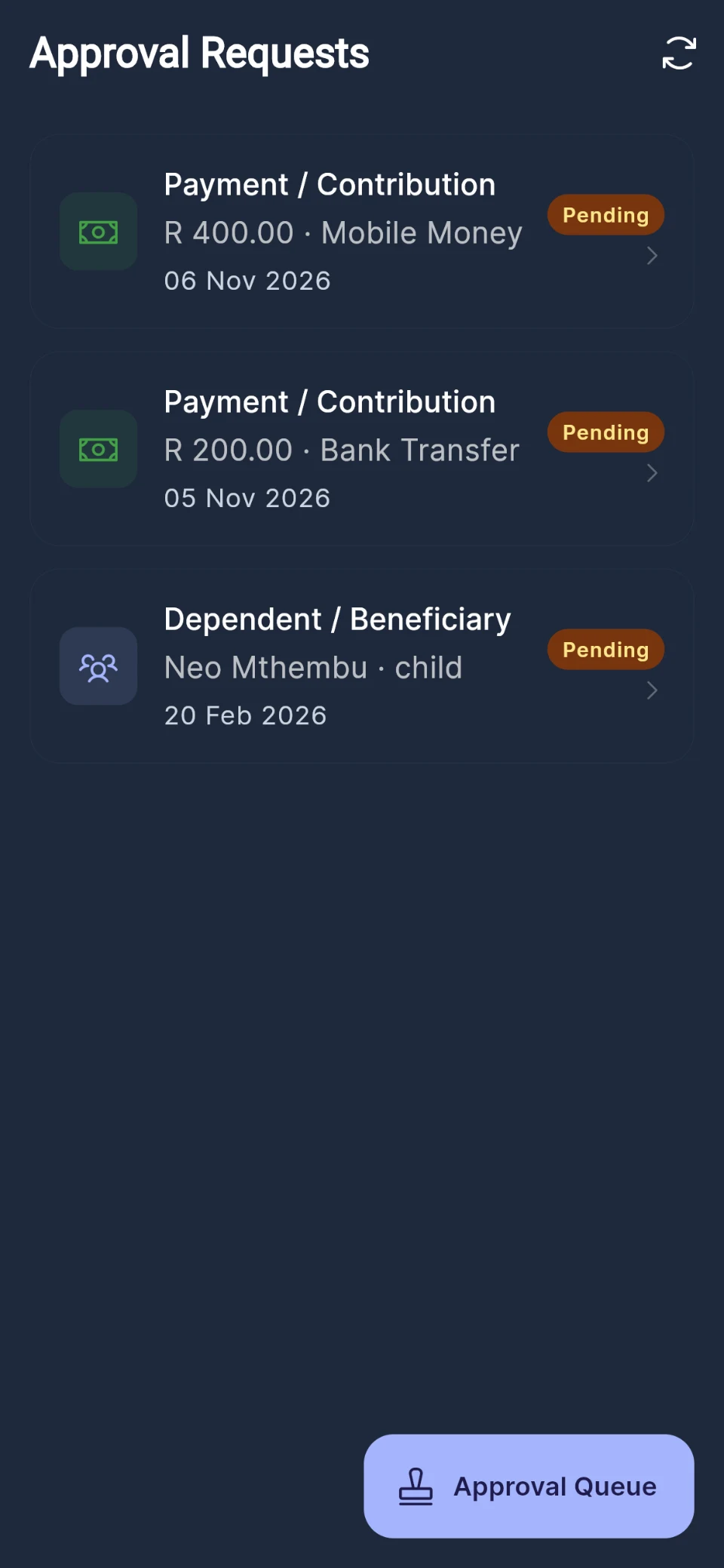
The approvals queue in Burial Desk: payments members have declared, waiting for the treasurer to confirm, and a beneficiary waiting for approval, shown with sample data.

Good standing

Your society's rules, applied the same way to everyone

Set how many missed meetings or months a member may have, and how much they may owe. Burial Desk applies those rules every night and after every payment or register, and restores a member's standing as soon as they catch up. An administrator can override the result either way.

  • Thresholds for missed meetings and missed months (three of each by default)
  • An optional rule that debt blocks claims beyond an amount you set
  • Standing shown on the member's record, card and cover statement
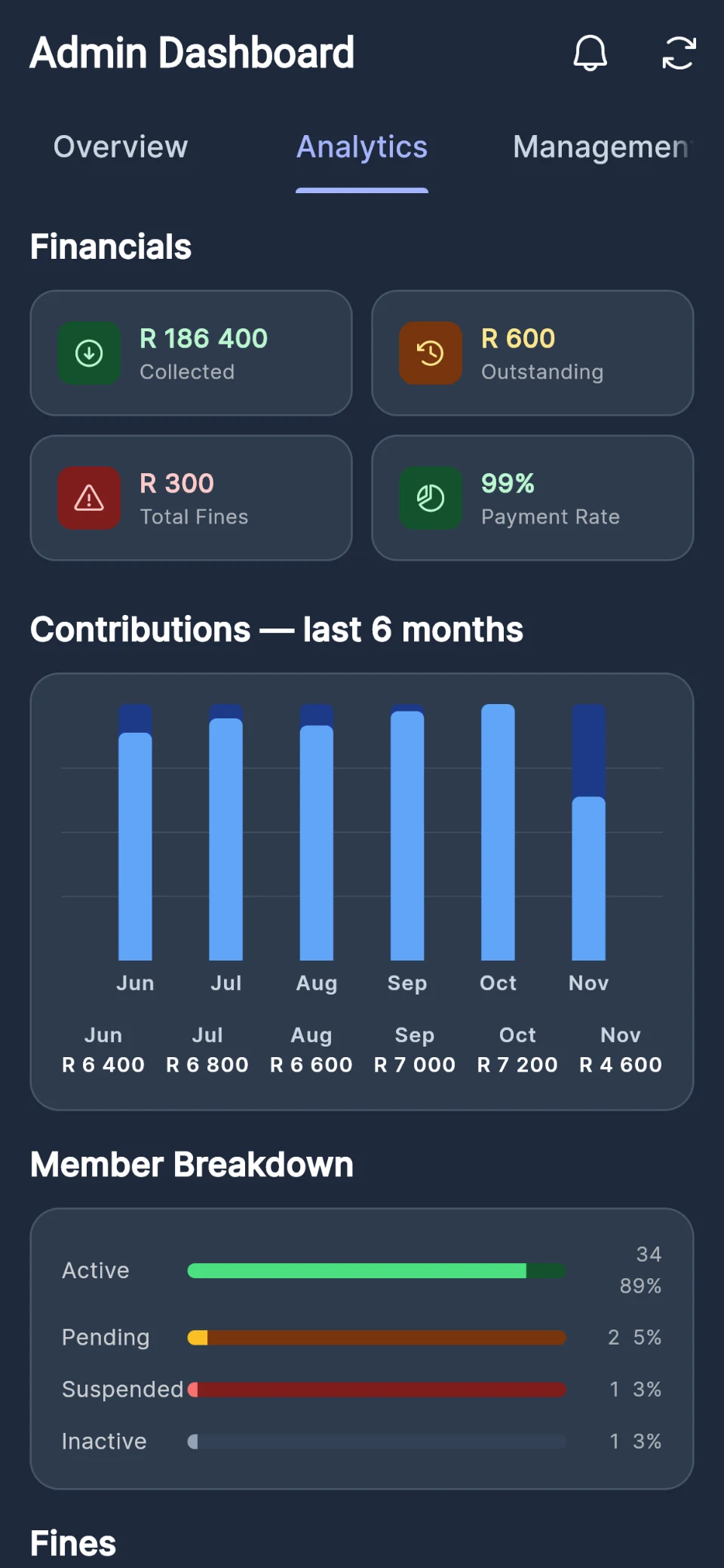
Society analytics in Burial Desk: money collected and payments awaiting confirmation, contributions over six months and members by status, shown with sample data.

Meetings

Meetings that take their own register

Schedule the meeting and every member is told. At the door, the host scans each member's membership-card QR code, or members check in with the meeting's code. Hosts record fines on the spot, and the minutes are kept with the meeting for everyone to read.

  • Hosts and next hosts, with a hosting history
  • A register that records attendance and cash contributions together
  • Minutes with action items, filed with the meeting
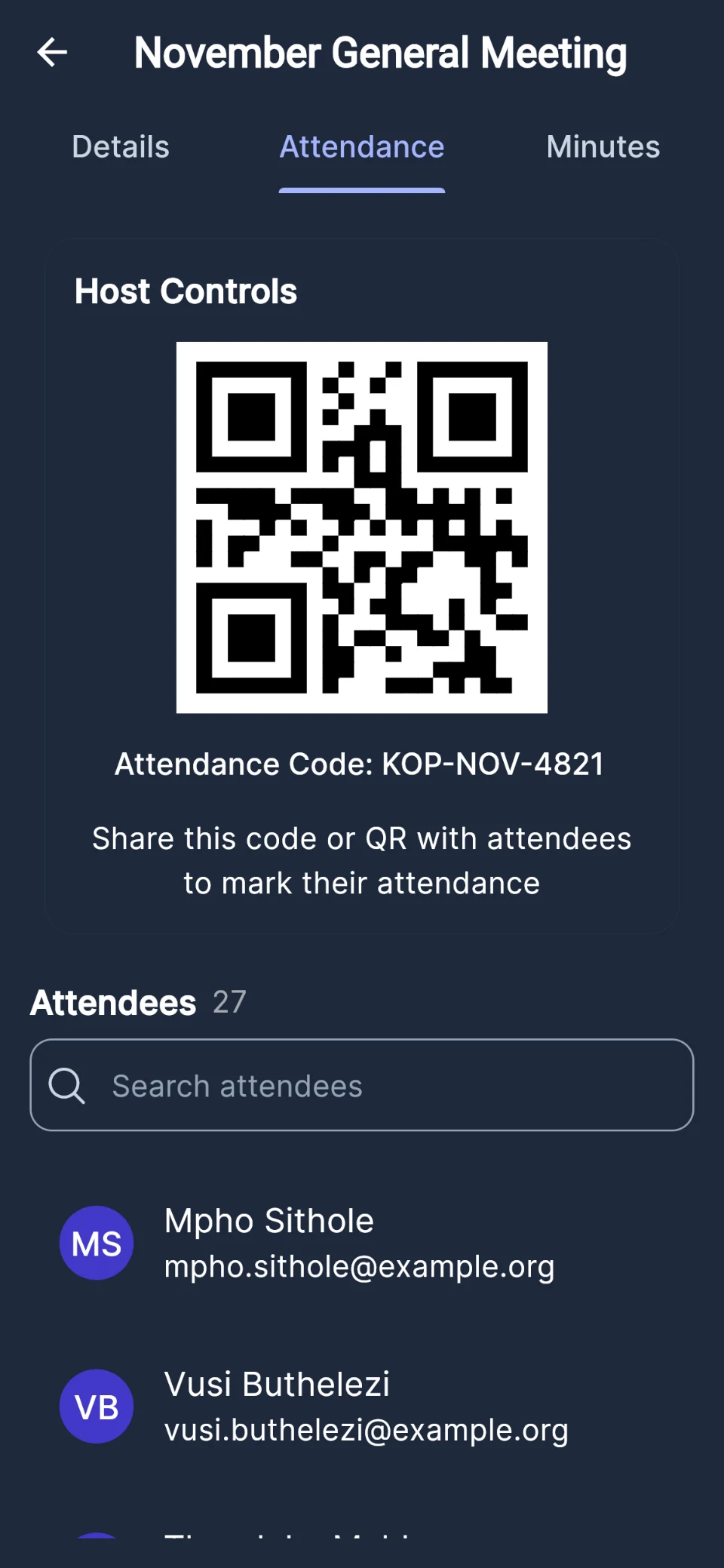
A society meeting's attendance screen in Burial Desk: the check-in QR code and attendance code, and the attendees, shown with sample data.

And the rest of the society's work

Beneficiaries, claims, notices and reports

  • Beneficiaries with approval

    Members add the people their cover pays for; an administrator or secretary approves each one. Your society sets how many each member may name.

  • Payout nominees

    Members name up to three people to receive their benefit, with shares that add up to 100%.

  • Claims with the checks built in

    Members lodge claims for their beneficiaries and administrators lodge them when a member dies, then attach the death certificate. Your waiting period and debt rules are checked when the claim is filed.

  • Your rules, set once

    The monthly contribution and due day, the waiting period, payout amounts for members, spouses and beneficiaries, and how many beneficiaries each member may name.

  • Announcements and notices

    Post an announcement and every member sees it in the app, with a push notification where they have allowed them.

  • Cover statements by email

    Email members a statement of their cover, with a link that opens without signing in.

  • Reports for the committee

    Contributions, attendance, fines and a financial summary, each exportable to CSV, plus a dashboard of the month's money.

  • Roles for office-bearers

    Member, treasurer, secretary, administrator and owner, with permissions you can adjust for each role.

  • A document library

    The constitution, minutes and forms in one place, with private documents for each member.

For every member

Members can answer their own questions

Each member signs in on their own phone and sees their own records: their cover, their payments, their beneficiaries and their card. Members cannot browse each other's personal details. By default they can see the society's contributions; an administrator can turn that off for any role.

  • My cover: whether they are covered, what their family would receive, and what they owe
  • Payments: their full contribution history, month by month
  • Beneficiaries: who they have named, and whether each is approved
  • Meetings and notices: what is coming up, and what the committee has announced
  • Membership card: with their standing and a QR code for meetings

Society plans

One flat monthly fee for your whole society

Choose the plan for the size of your society. Prices are in rand and exclude VAT.

Community

Small, tight-knit burial societies getting started with digital management.

R199/month

Up to 30 members · excl. VAT

Create your society
  • Contributions, fines and good standing
  • Meetings with QR attendance
  • Beneficiaries and claims
  • Announcements and push notifications
  • Reports and an activity log
  • Document storage (2GB)

Association

Growing societies that need room for more members and more storage.

R599/month

Up to 70 members · excl. VAT

Create your society
  • Everything in Community
  • Document storage (10GB)

Corporate

Large societies and federations, priced on the roster.

Custom

Up to 999 members · quoted on your roster

Talk to us
  • Everything in Association
  • Document storage (50GB)

Compare all plans and what they include

Questions from societies

Before you start

Which devices does it work on?

Burial Desk runs in any modern web browser on a computer, tablet or phone, and as an Android app from Google Play. On an iPhone, use Burial Desk in Safari; there is no App Store app at the moment.

How do our members join?

Give them a join code. Members enter it when they create their account and join your society straight away, then keep their own details up to date. Codes are eight characters long, last seven days and can be used up to ten times. You can also add members yourself, or import your member list.

Can we bring our existing member list across?

Yes. An administrator can import members from a CSV file with each member’s full name, ID number and email address (phone and address are optional), up to 5 000 at a time. Every row is checked and shown to you before anything is created.

Only the member list comes across: past contributions and attendance are not imported, and you can enter an opening balance for each member instead. Imported memberships start on the day of the import, so talk to us first if your members are already past their waiting period.

Can members pay their contributions online?

Yes, once your society connects its own PayFast merchant account. Members pay by card or instant EFT from the app, the money goes to your PayFast account, and the payment is recorded automatically when PayFast confirms it. Members who pay in cash or by EFT can send the treasurer a photo of their slip to confirm.

How do the society plans differ?

Society plans are priced by the size of your society. Each plan has a member limit and a document storage allowance, and you can move to a bigger plan as you grow. The current plans, and what each one lists, are on our pricing page.

Is there a free trial?

Every new burial society starts on a free trial, with reminders before it ends. To carry on, save a card on the Billing screen. Policy companies: talk to us about starting out.

Your organisation deserves better systems.

Take the next step towards simpler, smarter funeral organisation management.

Prefer email? Write to hello@burialdesk.co.za.